 I’ve been doing some form of project management for over 10 years. I’ve taken project management training and certification courses, listened to podcasts, shadowed more senior project managers and read countless books on project management. Each project manager has his or her own style, and I’ve learned that there isn’t one right or wrong way to manage a project. However, there are some key principles that are required – one of those principles is understanding how to create a plan and deliver on schedule. Now, I have gotten really, really good at creating plans and sticking to them at work. I can drive teams to deliver products and services on time and under budget like I was born to do it. The one thing I can’t do, however, is stick to any kind of plan in my personal life. No matter what I try, it always falls to pieces. I can’t seem to get a consistent cadence going. The number one reason for this is because I lack focus in my personal life. I have so many obligations and things I need to do for my family, that I sacrifice most things for that. Part of the hardest thing about being a working mom is the constant desire to give your kids the life a stay-at-home-mom would be privileged enough to give them, only you’re also working 40-60 hours a week depending on the week. Driven by “working mom’s guilt”, our post-work trips to the park, board games, kitchen dance parties, manicures (with sparkles on top), and seasonal cookie decorating almost always trump whatever other tasks I put on my plate. This sabotages any plan I put together (for a good cause, of course…)
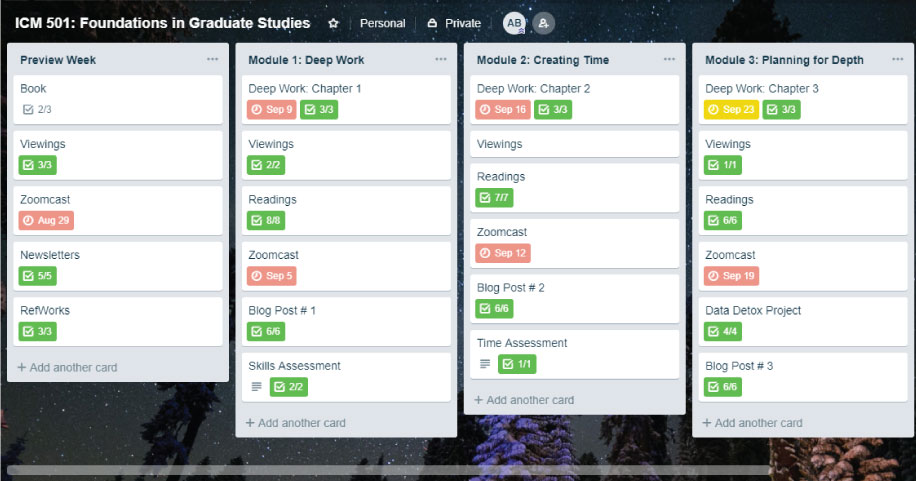
When I first signed up for Trello, I was hopeful that this project management tool could help me stick to a plan in my personal life, as well as offer a shiny new alternative to M.S. Project at work that would compliment our new Agile methodologies. Trello is comprised of boards, cards and other components like checklists. It lays out project work in a clear, hierarchical way that helps you break down the work into smaller, more manageable chunks. I love the simplicity and maneuverability of the cards. It took me mere seconds to build a framework and there wasn’t much of a learning curve (although I did watch a few video tutorials like How to Use Trello by YouTuber Jessica Stansbury). I started with a board for my Master’s ICM 502 class. I struggled a little bit in the beginning because when you start a new Trello project, you really have a very clean slate. You don’t really start with any kind of template at all. I found that I could think of many ways to slice and dice the work, which was a bit overwhelming. I finally decided to organize my coursework very close to the same way our internal university Blackboard site has it organized. It just made sense to me like this. I created a board for the course and then within that board, I have each week laid out with that week’s associated content, to-dos and assignments.
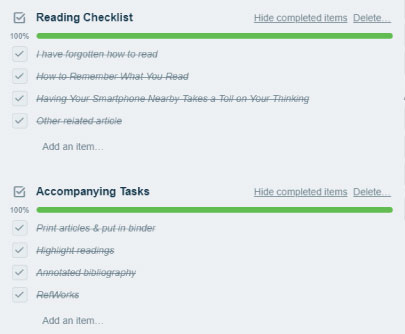
I scheduled our weekly virtual meetings, so I make sure my husband and I can plan for him to be home from work before then to take care of our daughter. One feature I really loved was the ability to create checklists within each card. I am a list person, so this feature got me very excited. I was able to break down each learning module task into the components of the task that I personally carry out each week to complete my work. Having a visual diagram of my work is extremely helpful. It feels good to be able to check items off my checklists each week. My plan is to use this board that I created going forward in my coursework and then assess whether or not it helps get my school work done on time.
Another approach I am working on is using Trello to house my weekly schedule. I plan to have a list for my weekly routine and then a list for each day of the week where I can go into detail on the tasks related to that day. Stay tuned for more updates on my Trello Weekly Routine project!

 The Corporate Mom Blog